How to Check a Keyword Ranking Without Starting a Tracker
Check a site's current Google position, interpret the result, and decide when a one-time rank check should become scheduled tracking.
In this guide
A client asks where their site ranks for one keyword. You need an answer now, not another project to configure.
A one-time rank check is the right starting point. It shows whether the domain appears in the current organic results, the ranking URL, and the pages around it. You can decide after seeing the result whether the keyword deserves ongoing tracking.
Use the keyword rank checker for the first check. Preparing the request is free. It carries into your FlexQueries account, where you review the estimate before requesting paid search data; eligible new accounts receive $1 toward usage.
A rank check needs three inputs
Enter the keyword, the website, and the market. Each one changes the answer.
The keyword should match the phrase you care about. A broad topic such as "accounting software" and a specific query such as "accounting software for construction companies" can return different competitors and landing pages.
Use the domain you want to find, without assuming which page Google will rank. The ranking URL is part of the result. If a blog post ranks when you expected a product page, you have learned something useful about Google's interpretation of the query.
Choose the market where the customer searches. A United States result cannot stand in for the United Kingdom or Australia. Local intent makes the difference larger, which is why map results need a separate local SERP checker.
Read more than the position
Position is the first answer, but it is not the whole report.
Check the ranking URL. A relevant page in position 18 may need better coverage, internal links, or authority. An irrelevant page in position 18 points to a page-selection problem. Improving the wrong URL can leave two pages competing with each other.
Review the surrounding results as well. Large publishers and strong category pages may explain why a newer page is stuck. Weak, dated, or poorly matched results can signal a realistic opening. The SERP checker gives you a closer look at the pages already ranking.
Search volume and keyword difficulty help size the opportunity. They should guide priority, not dictate it. A lower-volume term can be valuable when it maps to a buyer's problem. Check those signals with the keyword difficulty checker before committing to a larger content update.
A missing result is still a result
If the domain does not appear in the checked range, confirm the basics before changing the page.
- Check that the page is indexable and returns a successful response.
- Confirm that the title, heading, and main content answer the query.
- Look for another page from the same site that targets the same phrase.
- Inspect the current SERP to see whether Google favors guides, product pages, local results, or another format.
The on-page SEO checker can catch metadata, content, link, and structured-data problems on a public URL. Google Search Console remains the source for indexing and performance data on properties you control.
Know when to start tracking
One check answers a one-time question. Scheduled tracking helps when a change over time matters.
Start a tracker when you are publishing or updating a page, reporting to a client, watching a competitor, or measuring a launch. Use a consistent market and schedule so the observations can be compared. Daily checks add cost and noise for keywords that move slowly. Weekly tracking is often enough for an established page unless a launch or incident needs closer attention.
FlexQueries rank tracking uses the same pay-as-you-go balance as the one-time tools. The app estimates the scheduled work and stops when the available balance cannot cover the next run. You can turn on automatic reload if you want approved schedules to continue.
Keep a short decision record
Save the keyword, date, market, position, and ranking URL. Add one sentence explaining the next action. That record is more useful than a screenshot with no context.
If the page is moving in the right direction, keep the plan steady long enough to measure it. If the ranking URL changes, review cannibalization and internal links. If the page stays outside the useful range, compare the content and authority of the ranking pages before spending more time on small edits.
A rank check should end with a decision: leave the page alone, improve it, build a better-matched page, or track the keyword. The number on its own does not do the work.
Work through a ranking example
Suppose a payroll product wants to rank for "payroll software for restaurants." A mobile check in its target country finds a general payroll guide at position 17. The restaurant product page is absent from the first 40 organic results.
The useful finding is the mismatch between the query and the ranking page. Start by reading the results around position 17 and the first page. If the leading pages compare restaurant payroll products, a generic explanation of payroll may be a poor fit for the decision the searcher is making.
Inspect the intended product page before rewriting it. Check that it is indexable, linked from relevant pages, and actually explains restaurant-specific needs. A page that merely replaces an industry name in a template gives a reader little reason to choose the product.
Record the product-page changes and keep both URLs in view. At the next check, the intended page may appear, the guide may retain its position, or neither may improve. Those outcomes call for different follow-up work. A single position number would hide that distinction.
Why your manual search and the report differ
Your browser and a provider's observation may use different locations, devices, languages, times, and result settings. An incognito window does not remove every source of variation. Check those inputs before concluding that the report is wrong.
Also distinguish an organic position from the page's visual placement on screen. Ads, shopping results, map packs, and answer features can appear before an organic result. Position 1 does not mean the first thing every searcher sees.
Search Console adds another perspective: its position metric aggregates actual impressions under the report's selected scope. It is not the same measurement as one provider snapshot. Use Google's performance-report definitions when explaining a difference to a client.
Set a tracking budget before expanding the list
Choose the smallest set of keywords that will change a decision. Tracking both desktop and mobile creates two observations per keyword. Greater search depth increases the work, and scheduled queued checks have a different rate from manual live checks.
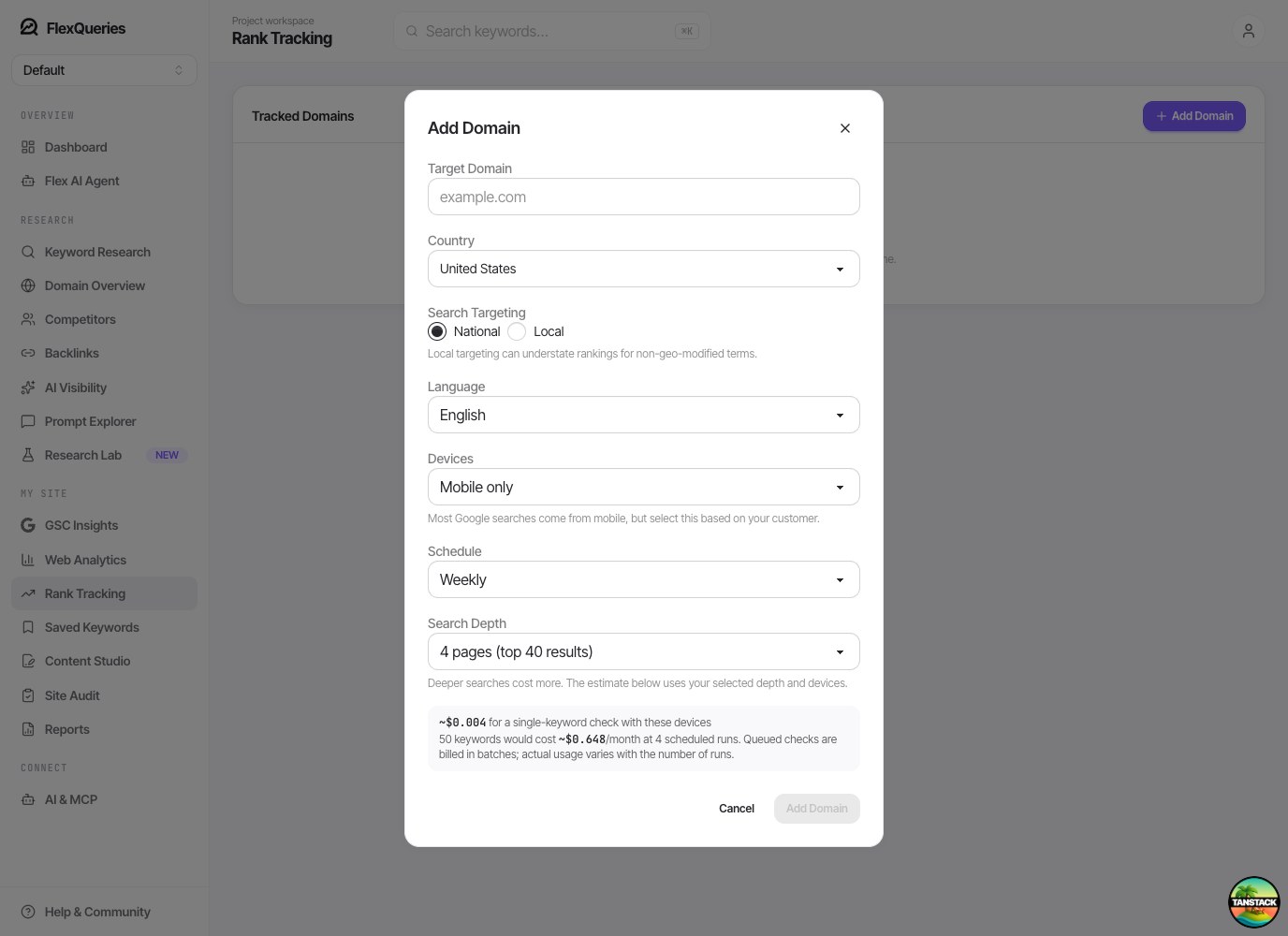
Use the estimate for the selected configuration. A monthly figure is an example based on a number of runs, not a subscription or a fixed bill: calendar length, pauses, manual checks, and changes to the keyword list affect actual usage. Review the first few runs before expanding a tracker from a handful of commercial queries to hundreds of terms.
Try the workflow with your own site, then use the results to decide what deserves your attention.
Explore the SEO tools