Backlinks
Backlink analysis for understanding a site's link profile
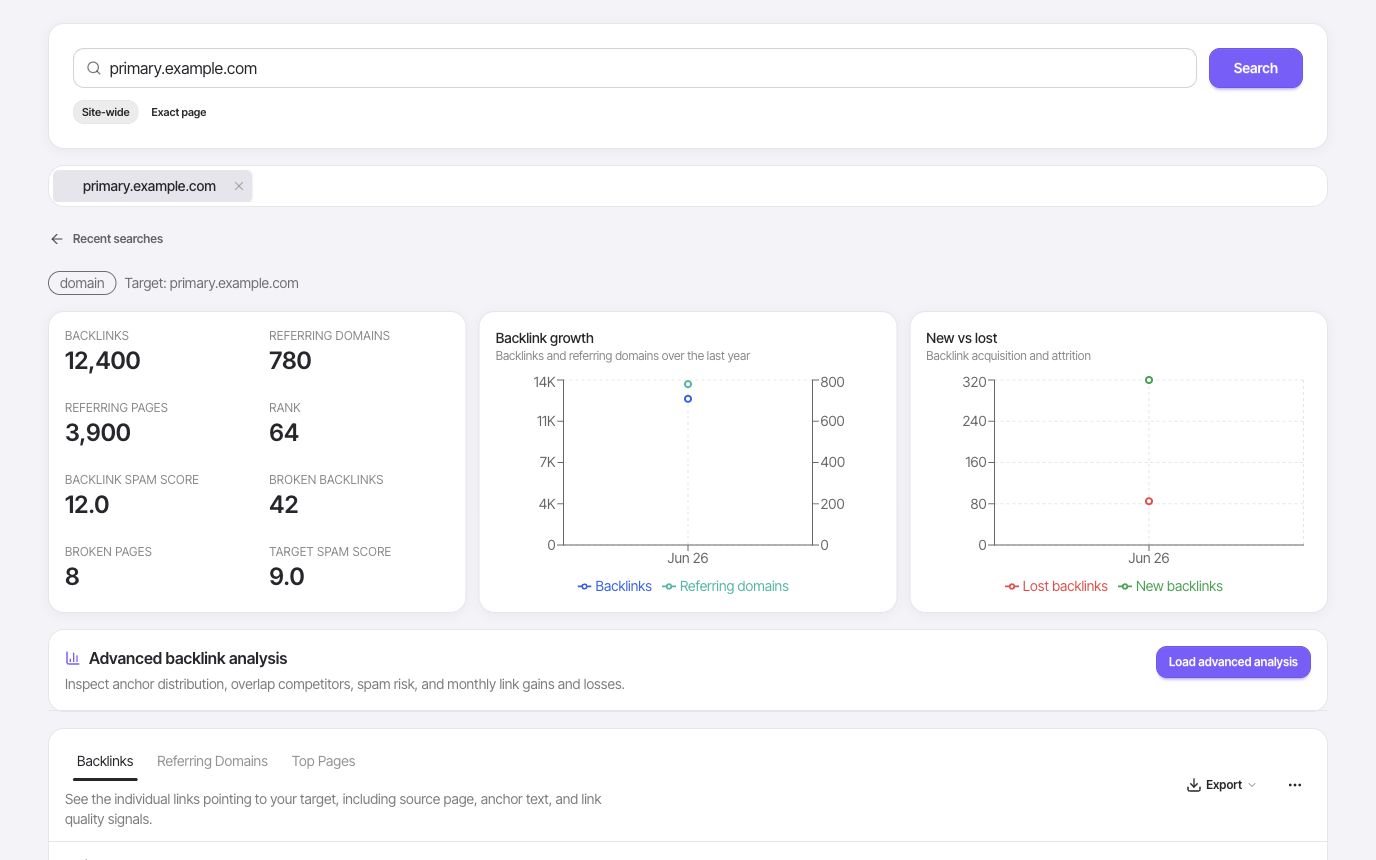
Analyze a domain's backlinks, referring domains, link attributes, and top pages inside your SEO workspace, with no separate link subscription.
- Backlinks
- Referring domains
- Target URLs
A closer look
Understand the links behind a domain
A backlink total is a starting point. The useful work is understanding who links, which pages earn those links, and whether the sources are relevant to your site. FlexQueries keeps the summary and link-level evidence close together.
Separate link volume from source diversity
Review the backlink profile alongside referring domains. Many links from one website tell a different story from links across many independent sources. Use the summary to orient the investigation, then look at the underlying rows before deciding what makes the profile strong or weak. The context matters more than a large total on its own.
- Backlink summary
- Referring domains
- Link-level rows
Inspect where the links lead
Look at source pages, destination URLs, and anchor text to understand why a link exists. Filter the available report signals to investigate nofollow, broken, lost, rank, or spam indicators. Treat these as clues for manual review: a flagged source is not automatically harmful, and a high metric does not make an unrelated link a useful prospect.
- Sources and destinations
- Anchor text
- Link status and attributes
Use competitor links to guide research
Check a competing domain and look for recurring publications, resource pages, or content formats that earn links. Export the relevant rows for review with your team. Follow that research into Domain Overview or keyword research to understand the content behind the links before deciding which opportunities are realistic for your own site.
- Competitor profiles
- Filtered exports
- Connected domain research
Put it to work
Find out why a competitor guide earns links
Start with the competitor domain, identify a linked guide, and inspect the referring pages and anchors. Group the useful sources by why they reference it: data, instructions, a comparison, or a resource list. Use that pattern to plan a useful asset of your own and a small, relevant prospect list.
Backlink data reflects the available provider index. Link and spam metrics are research signals, not Google penalties or a guarantee that a link will improve rankings.
One connected workflow
Your backlinks workflow
Start with a focused question, inspect the evidence, and keep the useful work in your project.
- 01
Check a domain's backlinks
Look up backlinks and referring-domain signals for your site, competitors, or pages you are evaluating.
- 02
Compare link quality
Use backlink rows, referring-domain rows, rank, spam, broken, lost, and nofollow signals to inspect link quality.
- 03
Filter and export link data
Export and filter backlink, referring-domain, and top-page data for your own outreach, competitor research, or cleanup review.
Use cases
- See who links to a competitor.
- Inspect link opportunities for important pages.
- Understand whether a domain has real authority before investing in content.
Why FlexQueries
- Backlink analysis sits beside keyword research, domain overview, and audit data.
- Filter and export backlink reports for your team's research workflow.
- MCP support lets an AI agent pull backlink context during SEO research.
Keep the research moving
FAQ
A few useful answers
What is a backlink checker used for?
A backlink checker helps you understand which sites link to a domain or page, which links have stronger rank, spam, broken, lost, or nofollow signals, and where competitors are earning authority.
Can I check competitor backlinks in FlexQueries?
Yes. FlexQueries's backlink workflow is designed for researching your own domain as well as competitor domains.
How does backlink research connect to SEO planning?
Backlinks add link-profile context that can inform link-building, digital PR, and competitor research alongside your keyword work.
Pay as you go
Do the research. Pay for the work you run.
Create an account with no card, use the included balance, and add funds whenever you need more.